Carrier Payables — track what you owe carriers in TMSDASH
Track what you owe your carriers. Payables are generated automatically when a brokered load is delivered, with pay terms, status, and reconciliation. (BrokerTMS only.)
Overview
Track what you owe your carriers. Payables are generated automatically when a brokered load is delivered, with pay terms, status, and reconciliation. (BrokerTMS only.)
How to get there
Key features
- Auto-generated payables on delivered brokered loads
- Pay terms and due-date tracking per carrier
- Status workflow: pending → approved → paid
- Reconcile against carrier invoices
Step-by-step
- 1Open the sidebar → Finance → Carrier Payables.
- 2Review payables generated from delivered loads.
- 3Approve payable amounts and track due dates by pay terms.
- 4Mark payables paid once settled with the carrier.
Page preview
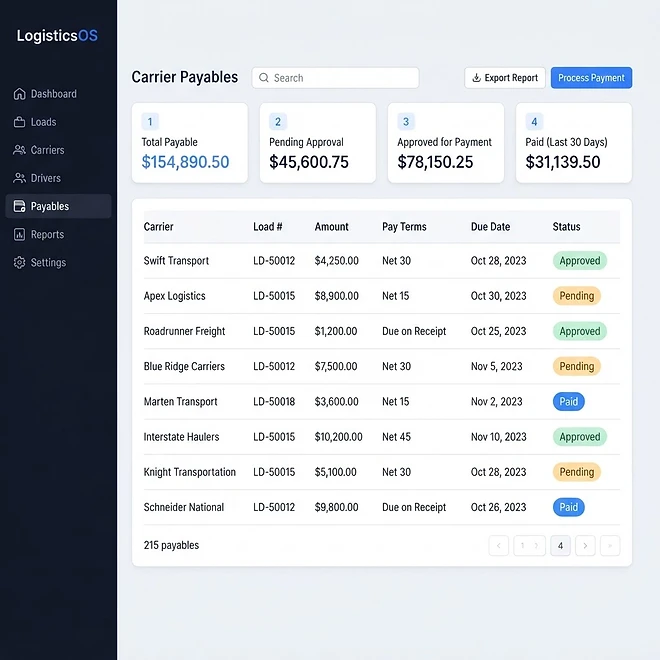
Representative screenshot of the Carrier Payables page.
Was this helpful?
Related modules
Your operational command center. It gives you a live snapshot of active loads, available drivers, vehicles on the road, and revenue collected — plus trend charts, a live driver-tracking panel, and a recent-loads feed.
The Load board is where you create, assign, and track every shipment. It supports three views — table, Kanban board, and calendar — plus search and filters for status and date, and one-click load templates for recurring lanes.
A real-time map of every driver with a GPS position. Markers show each driver’s location and status, with status cards beside the map for a quick read on who is on duty, off duty, or available.
A side-by-side calendar view of upcoming load pickups/deliveries and vehicle maintenance, so you can plan capacity and avoid scheduling conflicts at a glance.
Ready to put it into practice?
Start your free trial and explore this module with your own data.