Loads — create, assign & track shipments in TMSDASH
The Load board is where you create, assign, and track every shipment. It supports three views — table, Kanban board, and calendar — plus search and filters for status and date, and one-click load templates for recurring lanes.
Overview
The Load board is where you create, assign, and track every shipment. It supports three views — table, Kanban board, and calendar — plus search and filters for status and date, and one-click load templates for recurring lanes.
How to get there
Key features
- Table, Kanban, and Calendar views (toggle in the top-right)
- Search by load number, route, or driver name
- Filter by status and pickup date
- Create / edit / delete loads with full shipment details
- Assign a driver directly from the table row
- Drag load cards across Kanban columns to update status
- Save recurring shipments as templates and apply them in one click
- Per-load driver pay override — set a one-off pay method (percent, per-mile, hourly, or flat) and rate on the dispatch form, or leave it blank to use the per-driver default
- Live driver earnings preview — as you change rate, miles, hours, or pay method on the dispatch form, the estimated earnings card recomputes instantly so you see the pay before you save
Step-by-step
- 1Open the sidebar → Operations → Loads.
- 2Use the search bar to find loads by number, city, or driver.
- 3Pick a status from the dropdown and/or a pickup date to narrow the board, then click Clear to reset.
- 4Click New Load (top-right) to create a shipment; fill the form or click a saved template chip to autofill recurring details.
- 5In the table, use the driver dropdown on any unassigned row to assign a driver.
- 6Switch to the Kanban view and drag cards between columns to update status.
- 7Switch to the Calendar view to see pickups and deliveries across the month.
Page preview
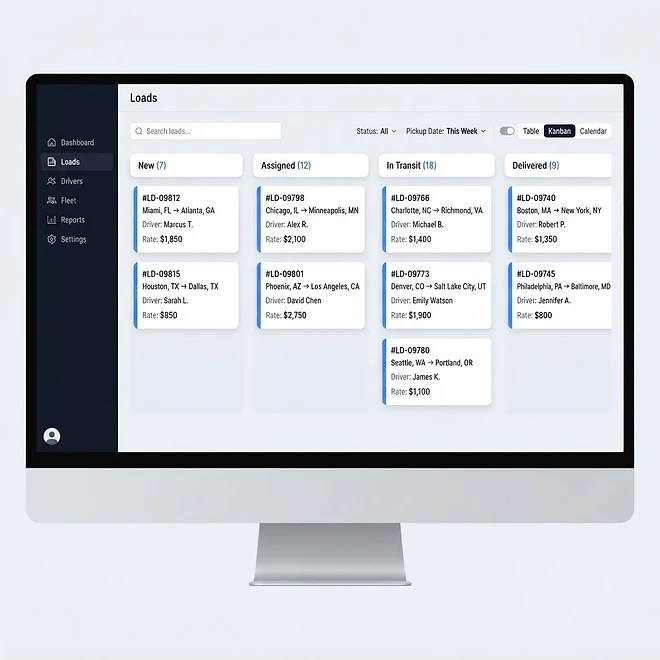
Representative screenshot of the Loads page.
Was this helpful?
Related modules
Your operational command center. It gives you a live snapshot of active loads, available drivers, vehicles on the road, and revenue collected — plus trend charts, a live driver-tracking panel, and a recent-loads feed.
A real-time map of every driver with a GPS position. Markers show each driver’s location and status, with status cards beside the map for a quick read on who is on duty, off duty, or available.
A side-by-side calendar view of upcoming load pickups/deliveries and vehicle maintenance, so you can plan capacity and avoid scheduling conflicts at a glance.
A central document library for billing, compliance, contracts, maintenance records, driver files, customer agreements, insurance, and permits — with visibility and tagging controls.
Ready to put it into practice?
Start your free trial and explore this module with your own data.