Carrier Directory — vendor management & load tendering in TMSDASH
A hub for managing carrier relationships and distributing freight, available to both carrier and broker workspaces. Maintain your approved carrier vendors with pay terms and portal access, browse the full FMCSA Motor Carrier List to find new partners — with live FMCSA carrier, docket, and operating-authority data one toggle away — and tender loads out on a drag-and-drop Kanban board that routes through your existing load-tender actions.
Overview
A hub for managing carrier relationships and distributing freight, available to both carrier and broker workspaces. Maintain your approved carrier vendors with pay terms and portal access, browse the full FMCSA Motor Carrier List to find new partners — with live FMCSA carrier, docket, and operating-authority data one toggle away — and tender loads out on a drag-and-drop Kanban board that routes through your existing load-tender actions.
How to get there
Key features
- Carrier Vendors tab — add / edit / delete carrier vendors with MC/DOT, contact, and pay terms
- Set portal access method: account, share link, or PIN
- Manage carrier status (active / inactive)
- Motor Carrier List tab — browse the full FMCSA census of US carriers, brokers, and forwarders without leaving the TMS
- Live FMCSA toggle — pull live carrier snapshots, docket numbers, and operating-authority records from the FMCSA register right in the list view and on carrier profiles
- Tender Board tab — a drag-and-drop Kanban (Available → Tendered → Accepted/Rejected) for distributing loads to carriers
- Tender transitions route through existing load-tender action functions and fire tender emails automatically
- Each tender is ownership-verified against your carrier workspace before it is created, so broker-to-carrier posting is reliable and secure
- Carrier Access Manager controls which carriers can see your available loads
- AI Carrier Risk Scoring — every carrier shows a 0–100 risk score with safety, reliability, fraud, and theft breakdown
- Double-brokering signal detection and theft incident counts surfaced on each carrier
Step-by-step
- 1Open the sidebar → CRM → Carrier Directory.
- 2On Carrier Vendors, click Add Carrier — enter company, contact, MC/DOT, and pay terms, then choose a portal access method.
- 3On the Motor Carrier List tab, search the FMCSA census to vet or add new carrier partners.
- 4On the Tender Board tab, drag load cards across columns to tender, accept, or reject them — each move runs the matching load-tender action and emails the carrier.
- 5Use the Carrier Access Manager to control which carriers see your available loads.
Page preview
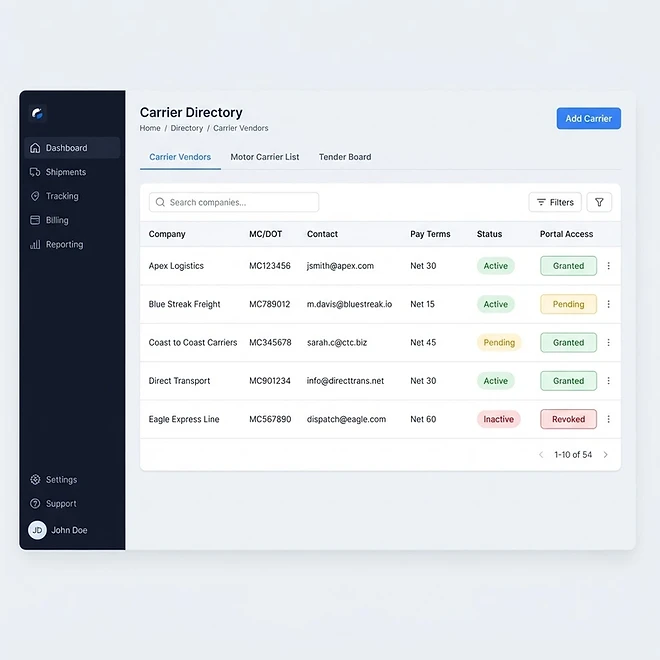
Representative screenshot of the Carrier Directory page.
Was this helpful?
Related modules
Your operational command center. It gives you a live snapshot of active loads, available drivers, vehicles on the road, and revenue collected — plus trend charts, a live driver-tracking panel, and a recent-loads feed.
The Load board is where you create, assign, and track every shipment. It supports three views — table, Kanban board, and calendar — plus search and filters for status and date, and one-click load templates for recurring lanes.
A real-time map of every driver with a GPS position. Markers show each driver’s location and status, with status cards beside the map for a quick read on who is on duty, off duty, or available.
A side-by-side calendar view of upcoming load pickups/deliveries and vehicle maintenance, so you can plan capacity and avoid scheduling conflicts at a glance.
Ready to put it into practice?
Start your free trial and explore this module with your own data.