Compliance Center — DOT, HOS & IFTA tracking in TMSDASH
Track every compliance obligation in one place — HOS, drug & alcohol, medical cards, DOT consortium, CDL renewals, DOT inspections, hazmat, and IFTA. Items can be scoped to a driver, vehicle, or the whole carrier, with due dates, reminder lead times, document uploads, automatic status and reminder digests, and a full audit log of every change. (CarrierTMS only.)
Overview
Track every compliance obligation in one place — HOS, drug & alcohol, medical cards, DOT consortium, CDL renewals, DOT inspections, hazmat, and IFTA. Items can be scoped to a driver, vehicle, or the whole carrier, with due dates, reminder lead times, document uploads, automatic status and reminder digests, and a full audit log of every change. (CarrierTMS only.)
How to get there
Key features
- Compliance items across 8 categories (HOS, drug & alcohol, medical card, DOT consortium, CDL renewal, DOT inspection, hazmat, IFTA)
- Scope per driver, vehicle, or carrier-wide
- Status workflow: compliant → due soon → overdue (with pending for new items)
- Configurable reminder lead days per item, with smart defaults by category
- Upload supporting documents (medical cards, certificates) to private storage
- Compliance reminders surface on the Schedule calendar, as in-app alerts, and via email digests
- Audit Log tab records every create, update, status change, and reminder event with actor, source (manual/automated), and a field-level diff
- Automated daily reminder workflow deduplicates by item and level so drivers and dispatch aren't spammed
Step-by-step
- 1Open the sidebar → Compliance → Compliance Center.
- 2Click Add Item — pick a category, scope (driver/vehicle/carrier), and due date.
- 3Set a reminder lead time and attach a supporting document if you have one.
- 4Review the summary cards for counts of compliant, due soon, overdue, and pending items.
- 5Open the Audit Log tab to see who changed what, when, and from where (manual or automated).
- 6Watch the Schedule calendar and your notifications for upcoming and overdue reminders.
Page preview
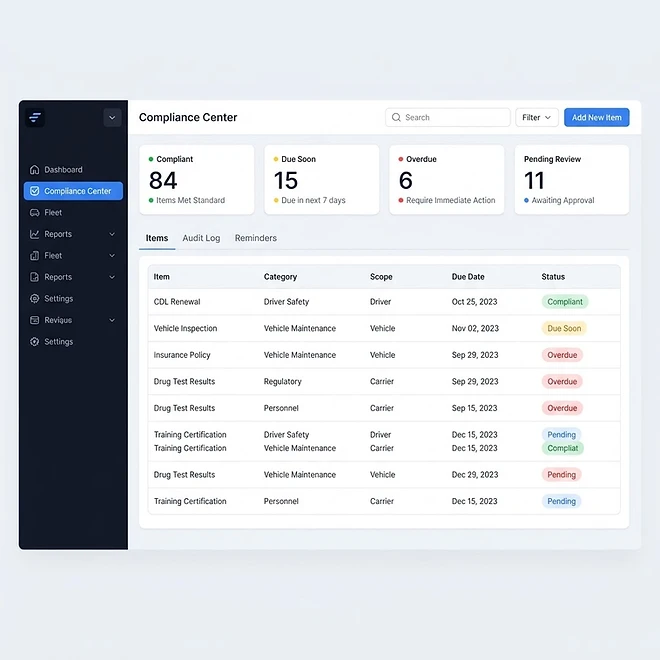
Representative screenshot of the Compliance Center page.
Was this helpful?
Related modules
Your operational command center. It gives you a live snapshot of active loads, available drivers, vehicles on the road, and revenue collected — plus trend charts, a live driver-tracking panel, and a recent-loads feed.
The Load board is where you create, assign, and track every shipment. It supports three views — table, Kanban board, and calendar — plus search and filters for status and date, and one-click load templates for recurring lanes.
A real-time map of every driver with a GPS position. Markers show each driver’s location and status, with status cards beside the map for a quick read on who is on duty, off duty, or available.
A side-by-side calendar view of upcoming load pickups/deliveries and vehicle maintenance, so you can plan capacity and avoid scheduling conflicts at a glance.
Ready to put it into practice?
Start your free trial and explore this module with your own data.