Profitability — per-load revenue vs cost in TMSDASH
Per-load profitability analysis that weighs load revenue against fuel and logged expenses, so you can see which lanes and customers are actually making money.
Overview
Per-load profitability analysis that weighs load revenue against fuel and logged expenses, so you can see which lanes and customers are actually making money.
How to get there
Key features
- Per-load revenue, cost, and net profit
- Fuel cost estimates using configurable pricing
- Profitability ranking by load and customer
Step-by-step
- 1Open the sidebar → Reports & Analytics → Profitability.
- 2Adjust the fuel price if needed for accurate cost estimates.
- 3Review the summary cards for total revenue, cost, and profit.
- 4Inspect the per-load table to find your most and least profitable shipments.
Page preview
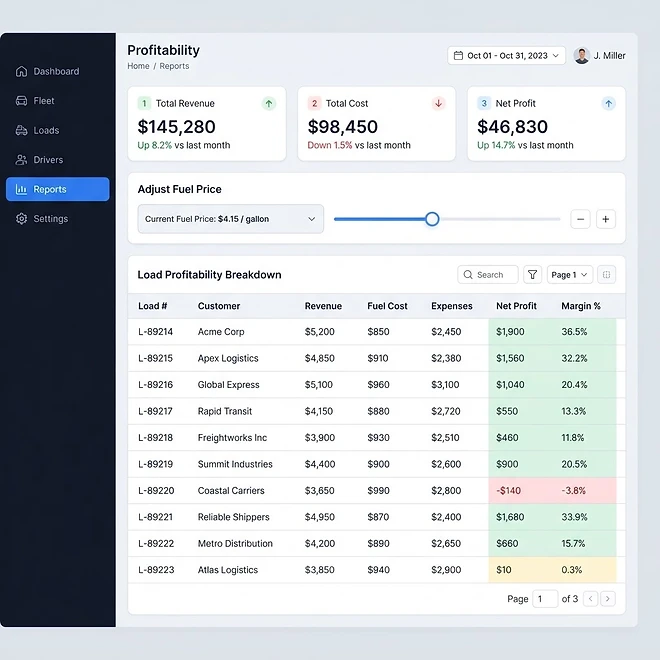
Representative screenshot of the Profitability page.
Was this helpful?
Related modules
Calculates payroll earnings per driver from completed loads. Each driver can carry a default pay method (percent, per-mile, hourly, or flat) and rate set on their record, and individual loads can override it. You can also set a global method and rate for the report, with date-range filtering and PDF export. Now a tab inside Drivers.
Ranks drivers by revenue generated from delivered loads, with performance metrics to help you reward top performers and coach underperformers. Now a tab inside Drivers.
A fleet reporting dashboard that analyzes completed loads, estimated fuel usage, and logged per-load profitability, with summary metrics, charts, and detailed tables.
A five-tab billing workspace — List, Recurring, Statements, Credit Notes, and Insights. Create invoices tied to loads and customers with itemized line items, attach supporting documents, send and record payments, and run bulk actions. Manage the billing lifecycle from draft to paid, accept Stripe checkout payments, and push invoice data to Google Sheets.
Ready to put it into practice?
Start your free trial and explore this module with your own data.