Maintenance Report — cost vs revenue by vehicle in TMSDASH
Compares monthly vehicle maintenance expenses against revenue so you can see which units are costing more than they earn and plan replacements or service schedules. Now a tab inside Maintenance.
Overview
Compares monthly vehicle maintenance expenses against revenue so you can see which units are costing more than they earn and plan replacements or service schedules. Now a tab inside Maintenance.
How to get there
Key features
- Per-vehicle maintenance cost vs revenue breakdown
- Monthly trend chart
- Identify high-cost units for review
Step-by-step
- 1Open the sidebar → Operations → Maintenance, then open the Report tab.
- 2Review the summary cards for total maintenance spend vs revenue.
- 3Inspect the per-vehicle table to spot high-cost units.
- 4Use the trend chart to watch maintenance costs month over month.
Page preview
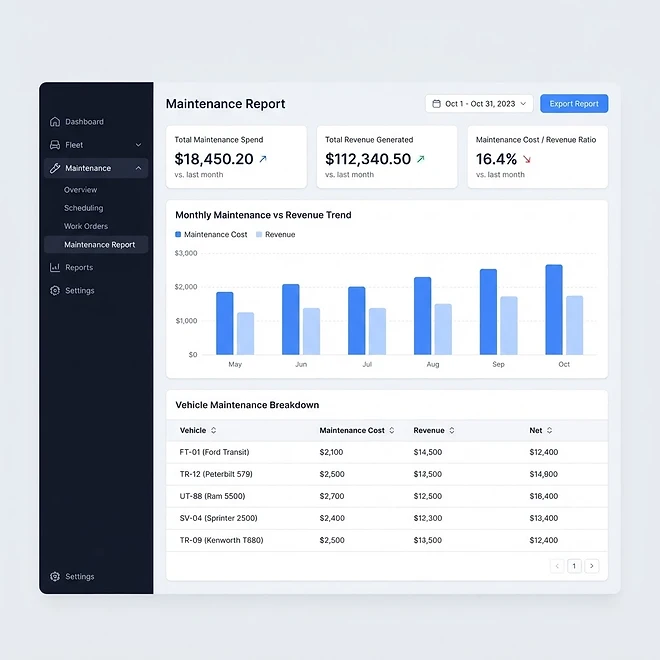
Representative screenshot of the Maintenance Report page.
Was this helpful?
Related modules
Manage every vehicle in your fleet — tractors, trailers, box trucks, vans, flatbeds, and reefers. Track unit numbers, capacity, mileage, fuel level, MPG, and maintenance schedules, with grid and maintenance-calendar views.
Manage your driver roster — contact details, CDL license class and number, hire date, status, assigned vehicle, current load, and live GPS location.
Your operational command center. It gives you a live snapshot of active loads, available drivers, vehicles on the road, and revenue collected — plus trend charts, a live driver-tracking panel, and a recent-loads feed.
Ready to put it into practice?
Start your free trial and explore this module with your own data.