Recurring Invoices — scheduled billing profiles in TMSDASH
Automate repeat billing with recurring invoice profiles. Define a customer, line items, tax, and a weekly, monthly, or quarterly cadence, and TMSDASH generates and sends a fresh invoice on each scheduled date. Profiles can be paused, resumed, or ended, and a daily workflow advances each profile's next generation date automatically.
Overview
Automate repeat billing with recurring invoice profiles. Define a customer, line items, tax, and a weekly, monthly, or quarterly cadence, and TMSDASH generates and sends a fresh invoice on each scheduled date. Profiles can be paused, resumed, or ended, and a daily workflow advances each profile's next generation date automatically.
How to get there
Key features
- Create recurring profiles with customer, line items, tax, and cadence (weekly / monthly / quarterly)
- Automatic generation — a daily workflow creates and sends invoices on each profile's next date
- Profile status: active, paused, or ended
- Optional end date and start date control the schedule window
- Last-generated invoice and date tracked per profile
- Pause or resume a profile without losing its schedule
Step-by-step
- 1Open the sidebar → Finance → Invoices, then open the Recurring tab.
- 2Click New Recurring Profile — pick a customer, add line items, and set the tax.
- 3Choose a cadence (weekly, monthly, quarterly), a start date, and the next generation date.
- 4Optionally set an end date and a default payment method, then save.
- 5The daily recurring-invoice workflow generates and sends invoices on each scheduled date and advances the next date.
- 6Pause a profile to skip generation, or resume it later; end a profile when the contract closes.
Page preview
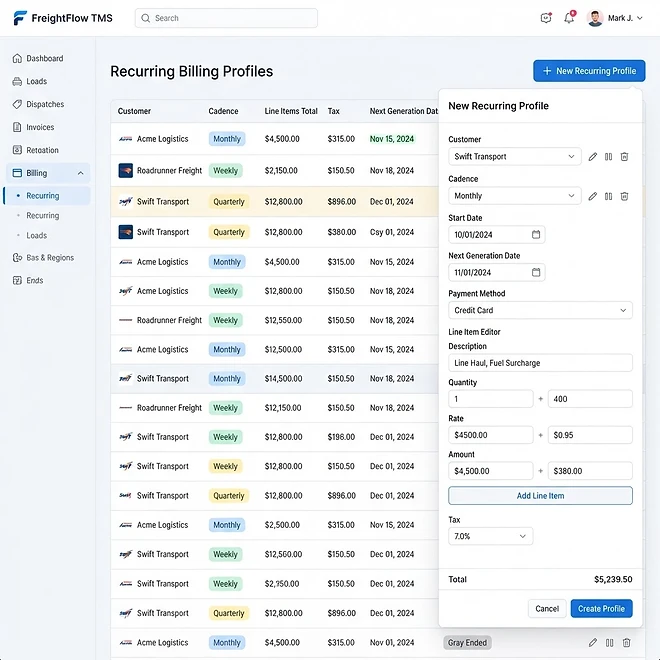
Representative screenshot of the Recurring Invoices page.
Was this helpful?
Related modules
Per-load profitability analysis that weighs load revenue against fuel and logged expenses, so you can see which lanes and customers are actually making money.
Calculates payroll earnings per driver from completed loads. Each driver can carry a default pay method (percent, per-mile, hourly, or flat) and rate set on their record, and individual loads can override it. You can also set a global method and rate for the report, with date-range filtering and PDF export. Now a tab inside Drivers.
Ranks drivers by revenue generated from delivered loads, with performance metrics to help you reward top performers and coach underperformers. Now a tab inside Drivers.
A fleet reporting dashboard that analyzes completed loads, estimated fuel usage, and logged per-load profitability, with summary metrics, charts, and detailed tables.
Ready to put it into practice?
Start your free trial and explore this module with your own data.