Driver Portal Profile — license & contact details
Drivers view and edit their profile — contact details, license class and number, and status — and review their account information.
Overview
Drivers view and edit their profile — contact details, license class and number, and status — and review their account information.
How to get there
Key features
- View driver profile and assigned vehicle
- Edit contact details and license info
- Review hire date and rating
Step-by-step
- 1Open the Profile tab in the driver portal.
- 2Review your current details.
- 3Edit contact or license information and save.
Page preview
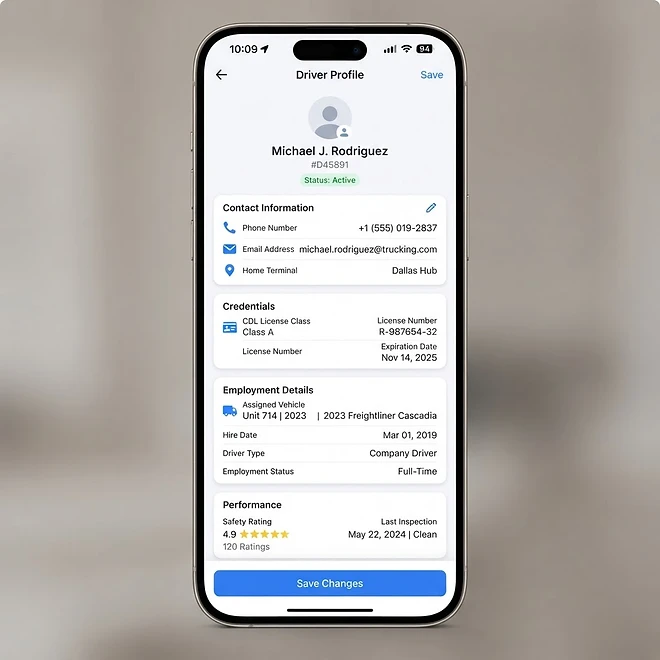
Representative screenshot of the Driver Portal — Profile page.
Was this helpful?
Related modules
The driver-facing home screen. Drivers sign in (company email/password or contractor PIN) and see their assigned loads, current status, and quick actions for documents, inspections, and fuel logging.
The detail view for a single assigned load. Drivers update load status (dispatched → in transit → delivered), add driver notes, and upload BOL/POD documents.
Drivers upload BOL, POD, and manifest files against their loads, with camera/file upload, categorization, notes, and a lightbox preview.
Drivers complete pre-trip and post-trip DVIR inspections, record defects and odometer, sign with a signature pad, and flag vehicles for maintenance when a defect is found.
Ready to put it into practice?
Start your free trial and explore this module with your own data.